


Released On 23rd Jul 2026
Common ADAS warning messages and what they usually mean
TL;DR: ADAS systems like lane assist and auto‑braking rely on cameras and radar, so warning messages usually mean they are blocked, confused or out of calibration – not that the car is “possessed”. If you see repeated alerts such as “lane assist unavailable”, “FCW/PCS system malfunction” or “front radar blocked”, your safety systems may be switched off and you should get them checked by a specialist who can test and calibrate the sensors properly, not just clear the fault codes.
(Lane assist, auto‑braking, radar faults)
Modern vehicles are packed with driver assistance systems designed to help you stay safer on the road. These are known as ADAS – Advanced Driver Assistance Systems – and they rely on cameras, radar and sensors around the car to keep an eye on what is happening while you drive.
When everything is working properly, ADAS can help prevent accidents, reduce driver fatigue and give you more confidence on busy roads. But when warning lights or messages appear for these systems – lane assist, auto‑braking, front radar and so on – it can be worrying and confusing.
In this article, we will explain some of the most common ADAS‑related warnings, what they usually mean, and why it is important to have them checked properly.
A quick reminder: what is ADAS?
ADAS covers a range of features, including:
- Lane‑keeping assist and lane‑departure warning
- Automatic emergency braking and forward‑collision warning
- Adaptive cruise control
- Traffic sign recognition
- Blind‑spot monitoring and rear cross‑traffic alert
These systems constantly monitor lane markings, other vehicles and obstacles using cameras and radar, then either warn the driver or apply gentle steering or braking if needed. They are there to assist – not replace – the driver, so you should always stay in full control of the vehicle.
Lane assist and lane-departure warning messages
Lane‑keeping assist (LKA) and lane‑departure warning (LDW) systems watch the road markings to help stop the car drifting out of its lane by mistake. Depending on the car, you might see:
- A small icon showing a car between lane lines
- An amber or green lane‑keeping symbol
- A lane icon along with a steering wheel symbol
Common messages and what they usually mean:
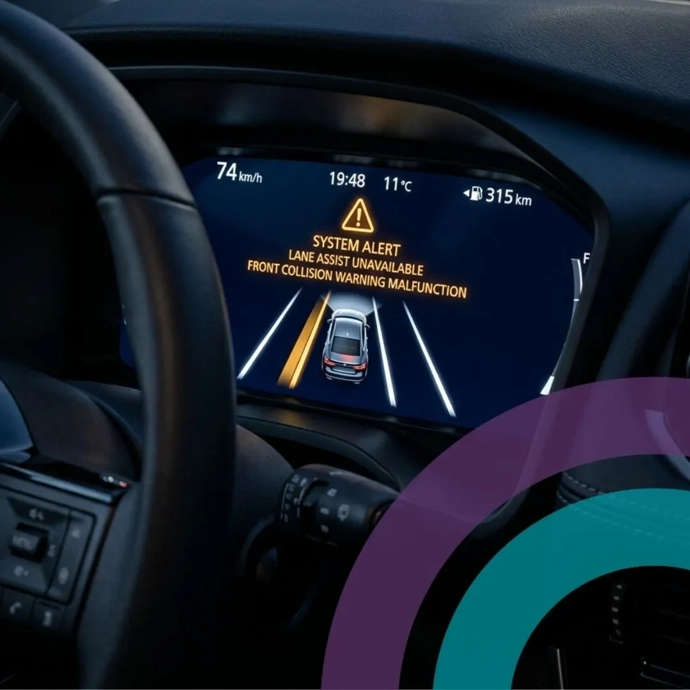
- “Lane keep assist unavailable” / “Lane assist temporarily unavailable” - Often appears in heavy rain, snow, fog, bright sun glare or when the camera view is blocked (dirt on the windscreen, ice, stickers around the mirror). The system usually comes back once visibility improves or the screen is cleaned.
- Lane icon greyed‑out or white - This typically means the system is on, but it cannot see the lane lines clearly enough to help you. Common reasons include worn or missing road markings, roadworks, very tight bends or driving at low speed where the system does not operate.
- Flashing lane icon with beeps or steering wheel vibration - This is a lane‑departure warning – the car thinks you are drifting out of your lane without indicating. You may feel a gentle steering nudge and hear a chime or feel a vibration in the steering wheel or seat to prompt you to correct.
If you start seeing lane assist faults regularly – especially after a windscreen replacement, suspension work or a bump – it can be a sign that the camera or alignment is out of calibration and needs a proper check.
Auto‑braking, forward‑collision and “FCW/PCS” warnings
Automatic emergency braking (AEB) and forward‑collision warning (FCW) systems watch the road ahead and warn you – or even brake – if you are getting too close to a vehicle or obstacle. Different manufacturers use different terms, such as:
- FCW (Forward Collision Warning)
- PCS (Pre‑Collision System)
- AEB (Autonomous / Automatic Emergency Braking)
Common warning messages include:
- “FCW system failed” / “FCW system failure”
- “Pre‑collision system malfunction” / “PCS not available”
- “Automatic emergency braking unavailable”
These warnings usually mean the car has detected a problem in the collision‑avoidance system, such as:
- A blocked or dirty front radar sensor (snow, mud, road salt, dead insects).
- A misaligned radar or camera after a minor collision, pothole impact or front‑end repair.
- A software or electrical fault in the ADAS control unit or wiring.
In many cars, a “system failure” or “malfunction” message also means that automatic emergency braking and collision alerts are switched off until the fault is fixed. That means less protection if something unexpected happens, so it is important not to ignore these warnings.
Front radar and sensor-related faults
Many ADAS features rely on front‑mounted radar units and ultrasonic sensors as well as cameras. When there is a problem, your dashboard may show:
- “Front radar unavailable” / “Radar blocked”
- “Radar cruise control unavailable”
- “Check radar sensor”
Typical causes include:
- Build‑up of dirt, snow, ice or road film on the radar cover or badge.
- Misalignment after a light front impact, kerb strike or even some bumper repairs.
- Water ingress or damage to wiring behind the bumper.
Sometimes, gently cleaning the area around the radar is enough to clear a temporary “blocked” message. However, if the warning keeps returning – or appeared after bodywork, a windscreen change or suspension/steering repair – the system often needs a proper calibration check using specialist ADAS equipment.
When is it safe to keep driving – and when to get help?
As a general rule... If the message says a system is “temporarily unavailable” due to poor weather or visibility, and it clears once conditions improve or you clean the sensors, it is usually not an emergency – but you should remember that assistance is reduced while the warning is on.
If the message says “system malfunction”, “system failed”, “check radar”, “ADAS fault” or similar, assume the assistance feature is switched off until it is checked properly.
Even when ADAS is working normally, it is not a substitute for your own awareness. The driver is always responsible for steering and braking – these systems are there to support you, not drive the car for you.
Why proper ADAS diagnostics and calibration matter
Because ADAS systems rely on precise sensor and camera alignment, guesswork can quickly become dangerous and expensive. A radar unit that is only a few millimetres out can “see” hazards in the wrong place, while a camera that is not calibrated after a windscreen or suspension repair may misread lane markings or distances.
At Okee, ADAS and driver‑assistance issues are treated as technical diagnostic work, not just “plugging in a code reader”. A proper assessment will typically include:
- Checking and recording dashboard warnings and stored fault codes.
- Visual inspection of cameras, sensors and mounting points.
- Verification of wheel alignment and suspension geometry where needed.
- ADAS calibration using specialist equipment and manufacturer data.
This structured approach helps to identify the real cause of the warning, rather than just clearing fault codes and hoping for the best.
When to speak to your specialist modern vehicle specialist
You should get in touch with a modern vehicle technology specialist like Okee if:
- ADAS warning messages keep returning even after cleaning sensors or in good weather.
- Warnings appeared after a windscreen change, bodywork repair, wheel alignment or suspension/steering work.
- You notice the car drifting within the lane, braking unexpectedly, or failing to warn you as it used to.
- You simply are not sure what the message means and want clear, straightforward advice.
Okee’s role is to help you understand what your car is telling you, investigate the fault properly and make sure your safety systems are working as they should. If you are seeing lane assist, auto‑braking or radar‑related warnings, we can book a structured ADAS assessment and explain the findings in plain English before any further work is agreed.